








Disallow Is Not Noindex: A Technical SEO Guide for Digital Marketers
Disallow Is Not Noindex: A Technical SEO Guide for Digital Marketers
Disallow vs Noindex SEO: Understanding the Basic Difference
Disallow vs Noindex SEO is an important topic for website owners and digital marketers. Robots.txt Disallow vs Noindex explains the difference between controlling crawler access and controlling search visibility. A Google Indexing SEO Guide, Robots.txt SEO Best Practices, and Technical SEO Indexing Guide can help marketers avoid common configuration mistakes.
The two instructions do different jobs. A Disallow rule in robots.txt tells crawlers not to access a specific URL or path. A noindex directive tells Google not to include a page in its search results.
This difference matters during technical SEO audits. A blocked page may still have a known URL, even when Google cannot crawl its content. External links can also help Google discover such URLs. Therefore, robots.txt does not work as a reliable method for completely removing a page from Google Search.
Digital marketers should also understand the difference between crawlability and indexability. Crawlability concerns whether Googlebot can access a page. Indexability concerns whether Google can include that page in its search index.
A page can remain accessible to Googlebot but carry a noindex directive. In that situation, Google can crawl the page, read the instruction, and exclude it from search results.
The opposite situation can create confusion. A robots.txt rule may block Googlebot before it reaches the page. As a result, Googlebot cannot read a noindex directive placed inside that page.
For businesses, this distinction can affect important URLs. Product pages, service pages, landing pages, blogs, and category pages may lose search visibility after an incorrect technical change.
That is why SEO audits should examine crawling and indexing separately. A simple robots.txt check cannot explain every indexing problem.
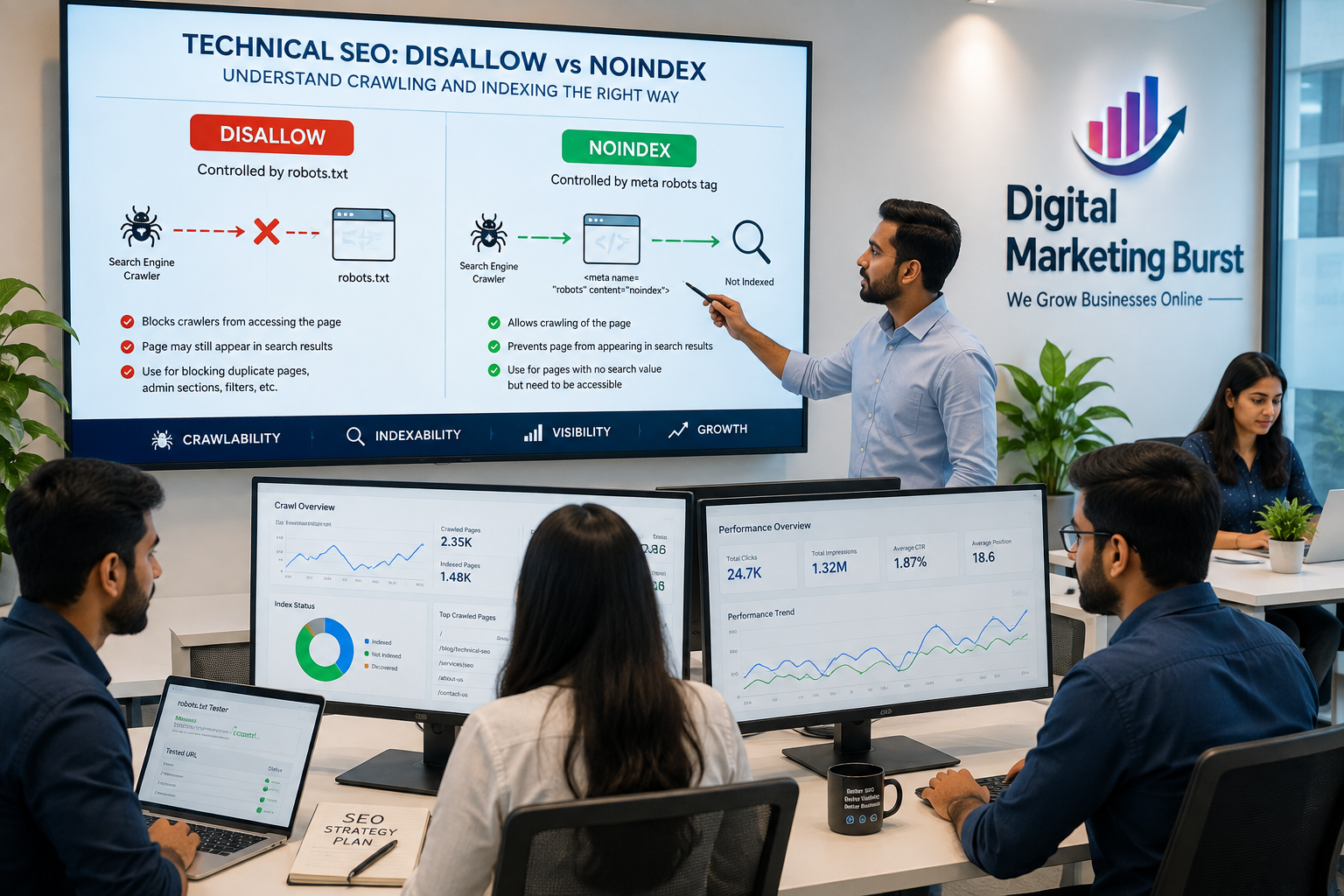
Robots.txt Disallow vs Noindex: Why They Are Not the Same
Think of the difference as access versus search visibility. Robots.txt mainly controls crawler access, while noindex tells Google not to include accessible content in its search index.
For example, imagine a website has a page that users can visit but the business does not want appearing in Google Search. A noindex directive can serve that purpose. Google must still access the page to read the instruction.
Now consider the same page with a robots.txt restriction. Googlebot may not reach the page at all. Without access, Google cannot read the noindex instruction.
This creates a common SEO mistake. A website owner may add both rules and assume they provide stronger protection. Instead, the robots.txt restriction can prevent Google from seeing the noindex directive.
Robots.txt still has an important role. Large websites can use it to manage crawler access and reduce unnecessary crawling of certain areas. However, marketers should choose the rule according to the actual SEO objective.
A blocked URL can also remain known to Google through links from other websites. In some situations, Google may show the URL in search even though it cannot crawl the page content.
This makes robots.txt unsuitable as a universal page-removal method. If the goal is to prevent a page from appearing in Google Search, use an appropriate indexing control instead.
Google Indexing SEO Guide: How Crawling and Indexing Work
A useful Google Indexing SEO Guide starts with understanding how Google processes web pages.
First, Google discovers a URL. Links, sitemaps, and other sources can help Google find new pages. Googlebot then attempts to access the discovered URL.
Next, Google processes the accessible page. It analyzes the content, page information, and other signals before deciding whether the page belongs in its index.
Technical accessibility does not guarantee indexing. Meeting basic technical requirements only makes a page eligible for indexing. It does not guarantee inclusion in Google Search.
Content quality can also influence indexing and search visibility. Google may choose not to index or prominently serve pages that provide limited value or duplicate information.
This process explains why marketers should not treat indexing as a single switch. Several technical and content signals work together.
A website redesign can make the situation even more complex. Developers may accidentally leave staging restrictions on the live website. A new template might also introduce an unwanted noindex directive.
For that reason, technical audits should examine robots.txt, robots meta tags, HTTP headers, canonical signals, XML sitemaps, redirects, internal links, and Search Console data.
Each element provides different information. Looking at the complete setup gives marketers a much clearer picture of what Google can access and what it can potentially index.
Robots.txt SEO Best Practices: Avoid Blocking Important Pages
Robots.txt SEO Best Practices begin with a simple principle: block only what genuinely needs crawler restriction.
A broad Disallow rule can affect an entire directory. If that directory contains valuable content, the rule may create an unexpected SEO problem.
Consider an ecommerce website with thousands of URLs. Some technical URL variations may not need frequent crawling. However, important product pages still need crawler access.
The same principle applies to blogs. A website may want to manage certain archive or parameter-based URLs while keeping published articles accessible.
Before adding a rule, identify the exact URLs it will affect. Test the configuration after making changes.
Robots.txt works best when marketers use it to manage crawler access and crawling resources. It should not act as a method for hiding important web pages from Google Search.
Security also matters. Robots.txt does not protect private information because the file remains publicly accessible. Use authentication or password protection for confidential content instead.
Simple rules are usually easier to maintain. Document unusual restrictions so future developers understand why they exist.
A careful robots.txt strategy protects crawl resources without accidentally blocking valuable search content.
Technical SEO Indexing Guide: Why Crawlability Matters
A strong Technical SEO Indexing Guide should separate crawling problems from indexing problems.
Crawling happens when Googlebot accesses a URL. If robots.txt blocks the URL, Googlebot cannot retrieve the page through normal crawling.
Indexing happens after Google processes accessible content. At this stage, Google evaluates the page and determines whether it can include it in its index.
This distinction helps explain many Search Console reports. A URL that Google cannot access requires a different solution from a page that Google crawled but did not index.
Internal links can also affect discovery. Important pages should have clear connections from relevant sections of the website.
XML sitemaps provide another discovery path. They can help search engines find important URLs, especially on large websites.
However, sitemap submission does not guarantee indexing. Google still evaluates the page after discovery and crawling.
Marketers should therefore avoid relying on a single technical signal. A healthy website combines accessible pages, useful content, logical internal linking, accurate sitemaps, and appropriate indexing directives.
This approach gives search engines a clearer understanding of the website.
Digital Marketing Burst and Technical SEO Strategy
Technical SEO works best when it supports the wider digital marketing strategy. Digital Marketing Burst can connect technical SEO with content marketing, keyword research, website optimization, local SEO, and search-focused growth.
The first step involves identifying important business pages. These pages need proper crawlability and suitable indexing settings.
Next, marketers can examine search intent and content quality. A technically accessible page still needs useful information that answers what users actually search for.
Internal linking can then connect related pages. This structure helps visitors navigate the website while giving search engines additional context.
Search Console data provides another layer of insight. Marketers can use it to investigate indexing patterns, crawling problems, and search performance.
The goal is not to make every URL visible in search. Instead, the objective is to make the right pages accessible and eligible for search visibility.
That principle keeps technical SEO connected to business outcomes rather than treating it as a collection of isolated settings.
Bilkul. Part 2 mein same rules maintain kar raha hoon: no external links, shorter sentences, active voice, varied sentence openings, transition words, and no long section without subheadings.
Noindex vs Disallow SEO: Which One Should You Use?
The choice between noindex and Disallow depends on what you want search engines to do with a URL. These two controls solve different SEO problems, so marketers should identify the actual requirement before making a change.
Suppose a page should remain accessible to visitors but should not appear in search results. In that case, a noindex directive may fit the objective better. Google can access the page, read the instruction, and understand that the page should not enter the search index.
Now consider a website section that receives unnecessary crawler activity. A robots.txt Disallow rule may help manage crawler access to that area. However, marketers should first understand which URLs the rule affects.
The difference becomes especially important on large websites. An incorrect Disallow rule can cover hundreds or thousands of URLs. A poorly placed noindex directive can also affect valuable pages when developers apply it at the template level.
Therefore, technical SEO decisions should start with the desired outcome. Ask whether the problem concerns crawler access or search visibility. Once the objective becomes clear, the appropriate method becomes easier to select.
Robots.txt Noindex Difference: A Common Technical SEO Confusion
Many website owners still confuse robots.txt with a noindex instruction. The confusion often comes from the fact that both can influence how search engines interact with URLs.
Robots.txt controls crawler access to specified paths. It does not function as a page-level indexing command. A noindex directive, on the other hand, tells search engines that an accessible page should not appear in their index.
Imagine a website that blocks a URL through robots.txt and also places noindex on that page. The crawler may never reach the page. Consequently, it may not see the noindex instruction.
This setup can make troubleshooting difficult. A marketer may believe that the noindex directive controls the page, while the crawler restriction prevents the instruction from being processed.
The solution starts with identifying the intended outcome. If the page needs to communicate a noindex instruction, search engines need access to that page.
For this reason, technical SEO teams should avoid adding both controls without a clear purpose. Each rule should have a specific role within the website’s indexing strategy.
Google Indexing Guide for SEO: Why Indexing Is Not Automatic
Getting a page discovered does not mean that Google will automatically index it. Search engines evaluate many signals before deciding which URLs belong in their index.
A new article may appear on a website today, yet it might take time before search engines process it. Even after crawling, indexing can depend on content quality, duplication, technical signals, and overall website structure.
Internal linking can help search engines discover important pages. A page that receives relevant links from established sections of the website has a clearer relationship with the rest of the site.
An XML sitemap can also support URL discovery. However, marketers should not treat sitemap submission as an indexing guarantee.
Content quality matters as well. Pages that provide little original information may struggle to gain search visibility even when the technical setup looks correct.
Website architecture plays another role. Important pages should not sit several layers deep without useful internal connections.
Technical marketers should therefore evaluate indexing from multiple angles. Checking only robots.txt can hide other problems.
A better workflow examines accessibility, indexing directives, canonical signals, internal links, sitemap inclusion, content quality, and search performance together.
Robots.txt Best Practices SEO: How to Avoid Accidental Blocking
A robots.txt file should remain simple and purposeful. Adding too many rules can make the configuration harder to understand and easier to break.
One common problem occurs when marketers block an entire folder without checking what exists inside it. A directory may contain both low-value technical URLs and important organic landing pages.
Another issue appears after website redesigns. The old URL structure may use different folders from the new architecture. A rule that worked previously can therefore become unsuitable after migration.
Testing helps prevent these mistakes. Review the affected paths before publishing any major change.
Large websites should pay even more attention to this process. A single rule can affect a large number of pages when the website uses shared directory structures.
Documentation also makes future maintenance easier. When a developer sees an unusual rule, they should understand why the website needs it.
Avoid copying a robots.txt file from another website. Different websites have different structures, content types, and SEO objectives.
Instead, build the file around the actual website. This approach reduces unnecessary restrictions and protects important pages from accidental crawler blocks.
Technical SEO Indexing Guide: The Role of Internal Links
Internal links do more than help visitors move between pages. They also create relationships between different sections of a website.
A well-structured website connects related topics naturally. For example, a broad SEO guide can link to detailed articles about crawling, indexing, redirects, and canonical URLs.
These connections help search engines understand the site’s content structure. They can also provide additional paths for discovering URLs.
Important pages should receive relevant internal links. A valuable service page should not depend entirely on an XML sitemap for discovery.
Context matters too. Links placed within relevant content can provide useful information about the destination page.
Broken internal links can create unnecessary friction. Visitors may encounter errors, while search engines may face incomplete navigation paths.
During a technical audit, marketers should therefore review internal linking alongside indexing signals.
The strongest structure usually combines clear navigation, contextual links, useful anchor text, and logical topic relationships.
This approach supports both users and search engines without requiring excessive optimization.
Google Indexing SEO Guide: Understanding the Role of XML Sitemaps
XML sitemaps can help search engines discover URLs that matter to a website. They become especially useful for large websites, frequently updated websites, and sites with complex structures.
A sitemap should contain URLs that the website actually wants search engines to consider. Including unnecessary or unwanted URLs can reduce the usefulness of the file.
For example, marketers should avoid treating the sitemap as a complete list of every URL generated by the website. Parameters, duplicate URLs, temporary pages, and irrelevant variations may not belong there.
The sitemap should also reflect the preferred URL structure. If another URL serves as the canonical version, the sitemap strategy should remain consistent with that choice.
Regular monitoring can identify outdated entries. Website migrations also require careful sitemap updates because old URLs may remain in the file after the site structure changes.
However, submitting a sitemap does not guarantee indexing. Search engines still evaluate each URL after discovery.
Therefore, marketers should use XML sitemaps as one part of a broader SEO system. They work best alongside strong internal linking, accessible pages, useful content, and clear technical signals.
Robots.txt SEO Best Practices for Ecommerce Websites
Ecommerce websites often have thousands of URLs. Filters, sorting options, search pages, product variations, categories, and tracking parameters can create large numbers of URL combinations.
This structure makes crawl management important. However, marketers should avoid blocking valuable product or category pages simply because they share a directory with less useful URLs.
Product pages usually need clear crawler access when organic visibility forms part of the marketing strategy. Category pages may also attract valuable search traffic.
Filtered URLs require a separate evaluation. Some filters can create useful landing pages, while others may generate unnecessary URL variations.
The technical team should understand how the ecommerce platform creates these URLs. A generic Disallow rule may not solve the actual problem.
Internal links deserve attention too. Important products should connect naturally with categories, related products, guides, and other relevant pages.
Sitemaps should focus on preferred URLs rather than every variation generated by the platform.
With a structured approach, ecommerce websites can manage crawl efficiency without accidentally restricting pages that contribute to organic revenue.
Technical SEO Indexing Guide for WordPress Websites
WordPress websites can develop indexing problems through themes, plugins, templates, categories, tags, and custom settings.
A single plugin configuration can sometimes affect large groups of pages. Therefore, marketers should check whether an indexing change applies to one URL or an entire content type.
Category and tag pages deserve individual consideration. Some websites use them as useful landing pages, while others create large amounts of repetitive content through these archives.
The robots.txt configuration should also match the actual WordPress structure. Avoid adding rules simply because they appear in a generic SEO tutorial.
Plugins can generate additional directives and canonical settings. When troubleshooting, check the rendered page rather than relying only on the CMS dashboard.
Website owners should also review important pages after theme updates. A template change can introduce unexpected technical settings.
Regular checks help catch problems early. The same process becomes even more important when several SEO plugins operate together.
A clean WordPress setup does not require excessive technical rules. It needs clear decisions about which pages deserve discovery, crawling, indexing, and organic visibility.
Digital Marketing Burst: Turning Technical SEO Into a Growth Strategy
Technical SEO becomes more valuable when it connects with content and marketing objectives. Digital Marketing Burst can position technical optimization as part of a wider organic growth strategy rather than treating it as an isolated website task.
The process starts with understanding the business and its target audience. Keyword research can then identify the topics and problems that potential customers search for.
Technical analysis follows the search strategy. Important pages should remain accessible, while unnecessary URL variations can receive appropriate crawl-management attention.
Content development can then support those target pages. Useful articles can answer customer questions and create internal links toward relevant commercial pages.
Local SEO can strengthen visibility for businesses targeting specific locations. Paid campaigns can support immediate traffic while organic strategies develop over time.
Analytics provides the final layer. Traffic, rankings, engagement, leads, and conversions can show whether the overall strategy is producing useful results.
This combination creates a more complete digital marketing system. Technical SEO provides the foundation, content attracts relevant searches, and marketing activities help turn visibility into business opportunities.
Bilkul. Part 3 same format mein hai: no external links, active voice, varied sentence openings, shorter sentences, transition words, and natural keyword usage.
Noindex vs Disallow SEO: How Technical Teams Should Make the Right Choice
The first step in solving an indexing problem is understanding what the website actually needs. A page that should remain available to visitors may need a different solution from a URL that creates unnecessary crawler activity.
Suppose a business has an internal utility page. Visitors may need access to that page, but the business may not want it appearing in organic search. In such a case, a noindex approach can support the intended search visibility.
On the other hand, a website may generate thousands of URLs through technical parameters. Some of those URLs may consume crawler resources without providing useful search value. A carefully planned robots.txt strategy can help manage access to such areas.
The distinction becomes even more important during website migrations. Developers often move folders, change templates, or introduce new URL structures. Old rules may then affect new pages in unexpected ways.
Before changing anything, create a list of affected URLs. Check which pages should appear in search and which pages should not.
After implementation, test the live website. Do not rely only on the development environment.
This simple process reduces accidental indexing problems. It also gives SEO teams a clearer record of why each technical rule exists.
Robots.txt Noindex Difference: What Happens When Both Rules Appear Together?
Using both robots.txt and noindex on the same URL can create confusion. The crawler restriction may prevent search engines from reaching the page and reading its indexing instruction.
Imagine that a page contains a noindex directive. The website owner then adds a Disallow rule for that URL. Googlebot may encounter the robots.txt restriction before it reaches the page.
As a result, the crawler cannot process the page-level instruction. The website owner may then wonder why the expected indexing behavior has not occurred.
This situation highlights the importance of understanding the order of operations. Search engines need access to a page when they must process information contained within that page.
Marketers should therefore avoid using technical directives simply because they seem stronger together. More restrictions do not always produce better SEO results.
Instead, each instruction should have a defined purpose. Robots.txt can manage crawler access, while indexing directives can communicate search inclusion preferences.
Technical audits should identify conflicting signals. When several controls affect the same URL, the intended outcome should remain clear.
A clean configuration is usually easier to monitor. It also reduces the chance of confusion during future website updates.
Google Indexing Guide for SEO: Why Some Pages Remain Out of Search
Not every accessible page will automatically appear in Google Search. Search engines evaluate pages based on multiple technical and content-related signals.
One reason can involve duplicate or highly similar content. If several URLs provide almost the same information, Google may select one version as the preferred result.
Canonical signals can help communicate that preference. However, marketers should still maintain a logical website structure.
Content quality also matters. A page that offers little unique information may struggle to gain visibility even when it has no technical restrictions.
Internal linking provides another important signal. Pages with useful connections from relevant content can become easier to discover and understand.
Website authority can also influence performance. New domains and newly published pages may need time to build visibility.
Search demand changes as well. A page can remain technically healthy while traffic declines because fewer people search for its target topic.
Therefore, marketers should not assume that every indexing problem comes from robots.txt or noindex settings.
A complete investigation should combine technical checks with content analysis and search-performance data.
Robots.txt SEO Best Practices: Managing Crawl Waste Without Blocking Valuable Content
Large websites often create more URLs than they need for organic search. Search filters, tracking parameters, internal search pages, and technical variations can multiply the number of crawlable addresses.
Crawl management can help websites focus search engine activity on useful areas. However, marketers need to understand the URL structure before blocking anything.
A broad directory rule can affect valuable content unexpectedly. For example, a website may store both technical files and important landing pages under the same folder.
The safer approach starts with URL analysis. Identify which patterns create unnecessary variations and which URLs contribute to search performance.
Website owners should also monitor changes after platform updates. Ecommerce systems and CMS platforms can change URL structures automatically.
A small technical adjustment may therefore have a large impact on crawling.
Documentation makes future maintenance easier. Teams can record the reason behind each major restriction and the URL patterns it affects.
Testing should follow every significant change. Check both restricted and unrestricted URLs.
This approach helps manage crawler activity without sacrificing pages that deserve organic visibility.
Technical SEO Indexing Guide: How Canonical URLs Fit Into the Picture
Canonical URLs solve a different problem from robots.txt and noindex. They help communicate which URL represents the preferred version when multiple pages contain similar or duplicate content.
Consider an ecommerce website with several URL variations for the same product. Filters or tracking parameters can create different addresses that lead to similar content.
Without a clear structure, search engines may need to determine which version deserves priority.
A canonical signal can help communicate the preferred URL. However, marketers should not use canonical tags as a universal replacement for other technical controls.
The canonical URL should also make sense from the website’s architecture. It should point toward the version that the business genuinely wants search engines and users to recognize.
Internal links should ideally support the preferred URL as well. Sitemaps can reinforce the same structure when they contain the correct URLs.
Technical SEO works best when these signals agree. Conflicting instructions can make troubleshooting more difficult.
During audits, marketers should therefore compare canonical URLs with robots.txt rules, indexing directives, redirects, internal links, and sitemap entries.
Consistency creates a cleaner technical environment. It also makes future website maintenance easier.
Google Indexing SEO Guide: Why Internal Search Pages Need Attention
Many websites create internal search pages automatically. Visitors may use these pages to find products, articles, or services.
However, these URLs can generate large numbers of variations. Each search query can potentially create another URL.
From an SEO perspective, most internal search results do not need to compete for organic traffic. They may also provide limited value to users arriving directly from a search engine.
For this reason, marketers should understand how the website handles internal search URLs. The CMS or search system may create indexing signals automatically.
A technical audit can identify how many such URLs exist. It can also reveal whether search engines are discovering them through internal links or other sources.
The solution should match the website’s needs. Do not apply a blanket rule without checking how the search system works.
Large websites should pay special attention to this area. Thousands of automatically generated URLs can complicate crawling and reporting.
A clean URL strategy helps search engines focus on content that matters to the business.
Robots.txt Best Practices SEO for Website Migrations
Website migrations create one of the biggest opportunities for technical SEO problems. The website may change domains, URL structures, folders, templates, or CMS platforms during the process.
Before launch, teams should document the important URLs. High-traffic pages deserve special attention because even a short-term technical problem can affect performance.
The existing robots.txt configuration should also be reviewed. Temporary development restrictions should not accidentally remain on the live website.
Indexing directives need similar attention. A noindex setting used during development can become a serious problem if developers carry it into production.
Redirects also matter. When old URLs move to new locations, relevant redirects can help preserve the connection between the previous and current addresses.
After launch, test important pages individually. Check whether they load correctly and whether the technical signals match the intended setup.
Monitor organic traffic during the following weeks. A sudden decline can indicate a migration-related problem.
Search Console data can provide additional clues. Look for unexpected indexing changes and crawl issues.
A migration should therefore include SEO testing before launch and monitoring after launch. This approach reduces the chance of discovering a major problem months later.
Technical SEO Indexing Guide: How Developers Can Prevent Indexing Mistakes
Developers play an important role in protecting search visibility. Small template changes can affect thousands of URLs when the website uses shared components.
For example, a change to a page template can accidentally add a noindex directive to an entire content type.
A modification to routing can also create new URL patterns. If the sitemap or internal links do not reflect those changes, search engines may receive mixed signals.
Development environments create another common risk. Teams often block crawlers while building a new website. That setting must be reviewed before production deployment.
A pre-launch SEO checklist can reduce these mistakes. Developers can test robots.txt, indexing directives, canonical URLs, redirects, sitemap files, and important page templates.
SEO teams should provide clear requirements. Developers need to know which pages matter most for organic traffic.
Communication works both ways. Developers should explain technical limitations, while marketers should explain the business impact of requested changes.
This collaboration creates a stronger workflow. Technical SEO becomes part of development rather than an emergency task after launch.
Google Indexing Problems SEO: How to Investigate a Sudden Traffic Drop
A sudden decline in organic traffic requires careful investigation. Changing robots.txt immediately may create another problem if the original cause lies elsewhere.
Start by identifying when the decline began. Compare traffic before and after the suspected change.
Next, examine the affected landing pages. A site-wide decline may indicate a technical or algorithmic issue, while a decline limited to a small group of pages may point to a content or URL problem.
Check important URLs for accessibility. Look for unexpected indexing directives or crawler restrictions.
Review internal links as well. A navigation change can remove valuable links to important pages.
Content changes deserve attention too. A redesign may alter headings, body text, structured information, or page templates.
Competitor activity can also influence rankings. Another website may have published stronger content or improved its search strategy.
Search demand should not be ignored. Seasonal changes and changing user interests can affect traffic without any technical failure.
The investigation should therefore cover technical, content, competitive, and search-demand factors.
Once the cause becomes clear, make the smallest effective change. Then monitor the results before introducing additional modifications.
Digital Marketing Burst: Combining Technical SEO With Content Marketing
Technical SEO creates the foundation, but content gives search engines and users a reason to visit the website. Digital Marketing Burst can combine both areas within a broader digital marketing strategy.
A content campaign should begin with real search demand. Keyword research can reveal questions, problems, and topics that potential customers actively explore.
Technical checks can then ensure that new pages remain accessible. Internal links can connect fresh articles with relevant service or product pages.
Content quality remains central. Articles should provide useful explanations instead of simply repeating keywords.
Local businesses can also connect content with location-based searches. Relevant service pages and informative articles can support local visibility without creating unnecessary keyword repetition.
Paid advertising can complement organic efforts. Google Ads and social campaigns can generate immediate exposure while SEO builds longer-term visibility.
Analytics helps connect these activities with business results. Traffic alone does not always show whether a strategy works.
Leads, enquiries, conversions, engagement, and qualified visitors can provide stronger indicators.
This integrated approach makes technical SEO more valuable. Instead of treating indexing as an isolated technical issue, marketers can connect it with the complete customer journey.
Bilkul. Part 4 de raha hoon. Same rules maintain hain: no external links, active voice, short sentences, varied sentence openings, transition words, and natural keyword placement.
Noindex vs Disallow SEO: Common Mistakes Digital Marketers Make
Technical SEO mistakes often happen when marketers use a familiar solution without checking the actual problem. Noindex and Disallow may look similar at first, but they serve different purposes.
One common mistake involves blocking a page in robots.txt and expecting Google to remove it from search immediately. That approach can create confusion because Google may still know that the URL exists.
Another problem appears when teams add noindex to pages that they actually want to rank. This mistake can affect important service pages, product pages, category pages, and articles.
Some websites also apply a rule to an entire folder without checking individual URLs. A single change can then affect many pages at once.
Website migrations create another risk. Development teams may use temporary restrictions during testing and forget to remove them before launch.
Plugins can also introduce unexpected indexing settings. This issue becomes more complicated when several SEO tools operate on the same website.
The safest approach starts with diagnosis. Identify the URL, determine the desired outcome, and then select the appropriate technical control.
Robots.txt Disallow vs Noindex: Mistakes That Can Affect Search Visibility
A poorly configured robots.txt file can create problems across an entire website. The impact depends on how broadly the rules apply.
For example, blocking a directory may also block valuable pages inside that directory. Marketers should therefore inspect the URL structure before adding a broad restriction.
Another mistake involves using robots.txt to hide sensitive information. This method does not provide security because the file itself remains publicly accessible.
Private information requires proper access controls. Password protection, authentication, or other security measures provide a more suitable solution.
Some websites also add unnecessary rules copied from online templates. Those rules may have made sense for another website but may not suit the current architecture.
The same issue can occur after a CMS migration. Old folder structures may no longer exist, while new pages may use completely different paths.
Regular audits help identify outdated rules. Teams should remove unnecessary restrictions when they no longer serve a purpose.
A simple configuration is usually easier to maintain. More rules do not automatically mean better crawl management.
Google Indexing Guide for SEO: Why Search Console Matters
Search Console provides useful information when marketers investigate crawling and indexing issues. It can help identify how Google processes individual URLs.
The URL Inspection feature can provide information about a specific page. Marketers can use it when an important URL does not appear as expected in search.
Search Console reports can also reveal broader patterns. A sudden increase in excluded URLs may indicate a technical change or content-related issue.
However, marketers should not rely on one report alone. Search Console data needs context from the actual website.
Check the page itself. Review its indexing directive, canonical URL, internal links, and accessibility.
Then compare the result with the intended SEO strategy. A page may appear as excluded because the website intentionally does not want it indexed.
That distinction prevents unnecessary technical changes.
Search Console becomes most useful when marketers understand what each report means. The tool provides information, but the SEO team still needs to identify the cause and choose the right solution.
Robots.txt Best Practices SEO: How to Audit a Robots.txt File
A robots.txt audit should begin with the complete file rather than a single rule. Review every directive and understand which URLs each rule can affect.
Next, compare the file with the current website structure. A website may have changed considerably since the file was first created.
Look for broad Disallow rules. These deserve special attention because they can affect many URLs simultaneously.
Important pages should receive particular focus. Check service pages, product pages, category pages, blog sections, and other pages that contribute to organic traffic.
After that, review whether the file contains unnecessary complexity. Old rules can remain in place for years even when the original reason no longer exists.
Testing should follow every major update. A technical team should confirm that important sections remain accessible.
Documentation can make future audits easier. Record why significant restrictions exist and which URL patterns they target.
This process does not require a complicated strategy. Careful review and clear documentation can prevent many avoidable crawl issues.
Technical SEO Indexing Guide: How Canonical, Redirect and Noindex Signals Differ
Canonical tags, redirects, and noindex directives solve different problems. Understanding their roles helps marketers avoid using the wrong technical solution.
A canonical signal can indicate the preferred version among similar URLs. It does not simply mean that every other URL should disappear from search.
A redirect moves users and crawlers from one URL to another. This approach becomes useful when a page has permanently moved or when the website has replaced an old URL.
Noindex addresses search inclusion. It tells search engines that an accessible page should not appear in the index.
These controls can sometimes work together, but marketers should not combine them without understanding the expected outcome.
For example, a permanently replaced page may need a redirect rather than noindex. A duplicate URL may need canonicalization rather than a blanket crawler restriction.
Technical SEO works best when each signal matches the actual URL situation.
Google Indexing SEO Guide: Why Content Quality Still Matters
Technical accessibility cannot guarantee strong organic performance. Search engines also evaluate the usefulness and relevance of content.
A page may have perfect technical settings but still receive little traffic. Weak search intent alignment can reduce its ability to compete.
Content should answer the question behind the search. Visitors should find useful information without unnecessary repetition.
Originality also matters. Pages that simply reproduce information available elsewhere may struggle to provide a strong reason for users to choose them.
Structure can improve readability. Clear headings, short paragraphs, useful examples, and logical navigation help visitors understand the subject.
Internal links can then connect the article with related pages. This creates a stronger content structure across the website.
Keyword usage should remain natural. Excessive repetition can make content difficult to read and may weaken the overall quality of the page.
A successful SEO strategy therefore combines technical accessibility with useful content.
Robots.txt SEO Best Practices for Blogs and Content Websites
Blogs often contain many types of URLs. Articles, categories, tags, author pages, archives, search pages, and media URLs can all create different crawl paths.
Not every URL needs the same SEO treatment. Some archive pages may provide useful search value, while others may create unnecessary duplication.
Content websites should first identify which sections generate meaningful organic traffic. Those sections deserve careful protection during technical changes.
Tag pages require particular attention. A website with hundreds of thin tag archives can create a large number of low-value URLs.
Internal search pages can create another challenge. Every search query may generate a separate URL, depending on the platform.
A technical audit can reveal whether these pages attract organic traffic or simply consume crawl resources.
The solution should match the website’s content strategy. Avoid applying blanket restrictions without understanding how the site uses each URL type.
A clean blog architecture makes technical SEO easier. It also helps readers move naturally between related topics.
Technical SEO Indexing Guide: How Website Developers and Marketers Can Work Together
Technical SEO works better when developers and marketers share the same objectives. Both teams influence how search engines access and understand the website.
Marketers usually understand search demand and business priorities. Developers understand the platform, templates, server configuration, and technical limitations.
Communication between both teams can prevent many problems. Before a major website change, SEO requirements should become part of the development plan.
Important pages should receive special attention during testing. Developers can verify technical behavior while marketers check search intent and page importance.
The teams should also agree on a launch checklist. Robots.txt, indexing directives, canonical URLs, redirects, XML sitemaps, and internal links deserve review before deployment.
After launch, both sides should monitor the website. Technical teams can investigate errors, while marketers can monitor organic traffic and rankings.
This collaborative approach reduces emergency fixes. It also makes SEO part of the development process instead of treating it as a post-launch task.
Google Indexing Problems SEO: When a Technical Fix Is Not Enough
Sometimes a website has no obvious crawling restriction, yet organic traffic remains low. In such cases, marketers should look beyond robots.txt and indexing directives.
Content competition may have increased. Competitors can publish deeper resources, improve page experience, or build stronger topical coverage.
Search intent can change as well. A page created several years ago may no longer answer what users currently want.
The website’s internal structure may also need improvement. Important pages can lose visibility when internal links disappear or navigation changes.
Page performance can influence the overall user experience. Slow-loading pages can make visitors leave quickly, especially on mobile devices.
External authority may also affect competitive queries. Stronger websites can outrank newer or less established pages even when the technical setup looks healthy.
For this reason, SEO diagnosis should follow evidence. Fix the technical issue first when one exists, but continue investigating other ranking factors when performance does not recover.
Digital Marketing Burst: A Complete Approach to Technical SEO
Digital Marketing Burst can position technical SEO as one part of a complete digital marketing strategy. The objective is not simply to fix website errors. It is to create a stronger foundation for organic growth.
The process can begin with a technical audit. The audit identifies crawlability issues, indexing signals, broken links, redirects, canonical problems, and other structural concerns.
Content strategy then targets relevant search demand. Keyword research helps identify topics that can attract qualified visitors.
On-page optimization improves the relationship between content and search intent. Internal linking connects related pages and strengthens the overall content structure.
Local SEO can support businesses that target specific locations. Google Business Profile optimization and location-focused content can complement the wider search strategy.
Paid advertising can provide another acquisition channel. Google Ads and social media campaigns can support immediate visibility while organic SEO develops.
Analytics brings these activities together. Traffic, enquiries, leads, conversions, and engagement provide a clearer view of marketing performance.
This integrated approach allows businesses to treat SEO as a growth channel rather than a technical checklist.
Bilkul. Part 5 same rules ke saath: no external links, active voice, short sentences, varied sentence openings, transition words, and no unnecessary keyword repetition.
Noindex vs Disallow SEO: How to Audit Individual URLs
A technical SEO audit should not rely only on site-wide settings. Individual URLs can have different indexing requirements, even when they belong to the same section.
Start by identifying the purpose of the page. A service page usually needs different treatment from a temporary utility page.
Next, check whether Googlebot can access the URL. If a robots.txt rule blocks the page, investigate why that restriction exists.
After that, inspect the page’s indexing directive. Look for noindex settings in the HTML or applicable HTTP headers.
The canonical URL deserves attention too. A page may point toward another URL as its preferred version.
Internal links provide another useful clue. Important pages should have relevant links from other parts of the website.
Finally, compare the page with the XML sitemap. A URL that the business wants indexed should generally have a consistent technical setup across these signals.
This process creates a complete picture. Instead of changing one setting blindly, marketers can identify the actual reason behind the indexing behavior.
Robots.txt Disallow vs Noindex: Understanding URL-Level Problems
URL-level problems can become difficult when several technical signals point in different directions. A page may have a Disallow rule, a noindex directive, a canonical pointing elsewhere, and very few internal links.
Each signal tells search engines something different. The combination can therefore create an unexpected result.
Imagine an important landing page that sits inside a blocked directory. The page itself may contain useful content and a correct title, but Googlebot cannot access it normally.
Removing the block may solve the crawling problem. However, marketers should then check the page for other indexing restrictions.
A different URL may have noindex even though the business wants it to rank. In that case, removing the unwanted directive becomes more important than changing robots.txt.
The correct solution depends on the evidence.
That is why URL-level audits work better than assumptions. Marketers can inspect the exact page and identify which signal creates the problem.
Google Indexing Guide for SEO: Why Newly Published Pages Need Time
New content does not always appear in search immediately. Search engines need to discover, crawl, process, and evaluate newly published URLs.
Internal links can help discovery. A new article connected from an established section may have a clearer path for search engine crawlers.
XML sitemaps can also support discovery. They become particularly useful when websites publish content frequently.
However, marketers should avoid expecting instant indexing after publishing. Search engines control their own crawling and processing schedules.
Content quality also matters during this stage. A newly published page should provide useful information rather than simply target a keyword.
Strong internal structure can support the page’s long-term visibility. Relevant articles, category pages, and service pages can connect with the new content.
If a page does not appear after a reasonable period, investigate the technical setup. Check accessibility, indexing directives, canonical signals, internal links, and sitemap status.
This approach prevents unnecessary changes. It also helps distinguish a normal processing delay from a genuine technical problem.
Robots.txt Best Practices SEO: How to Handle Temporary Website Sections
Websites often contain temporary sections during development, testing, or marketing campaigns. These areas may not need normal crawler access.
A technical team can manage such areas carefully. However, temporary restrictions should have a clear purpose and an equally clear removal plan.
Development websites commonly use crawler restrictions. The problem occurs when those settings remain active after the website moves into production.
A launch checklist can prevent this mistake. Teams should review robots.txt and indexing directives immediately before deployment.
Temporary campaign pages need a different evaluation. Some campaign pages may deserve organic visibility, while others exist only for paid traffic.
The business objective should guide the technical decision. Do not block a page simply because it was created for a short-term campaign.
Once a temporary section becomes permanent, review its technical configuration again. Old restrictions may no longer make sense.
Good documentation helps teams track these changes. It also reduces the chance that another developer removes or keeps a rule without understanding its purpose.
Technical SEO Indexing Guide: How HTTP Headers Can Affect Indexing
Not every indexing instruction appears directly inside HTML. Websites can also send indexing-related directives through HTTP response headers.
This becomes important for certain file types and technical resources. A marketer may inspect the page source and find nothing unusual, while the server sends an indexing instruction separately.
Technical audits should therefore consider both page-level HTML signals and server-level responses.
Developers can inspect the HTTP response when a URL behaves unexpectedly. This step can reveal directives that a normal visual inspection may miss.
Server configuration can also affect crawler access. Authentication, response errors, redirects, and access restrictions can prevent search engines from processing a URL correctly.
For this reason, technical SEO requires cooperation between marketers and developers. The marketing team may identify the search problem, while developers can investigate server-level behavior.
A complete audit considers the entire request process. The browser experience alone does not always reveal what search engine crawlers receive.
This level of checking becomes particularly useful during migrations and major platform changes.
Google Indexing SEO Guide: How Redirects Affect Search Visibility
Redirects help websites manage URL changes. They become especially useful when a page moves to a new location or when an outdated URL needs to point toward a relevant replacement.
A redirect can preserve the relationship between an old URL and its new destination. However, marketers should avoid creating unnecessary redirect chains.
For example, an old URL should ideally lead toward the current relevant page instead of passing through several intermediate addresses.
Internal links should also point toward the final URL. This reduces unnecessary redirects for both users and crawlers.
Redirects deserve special attention during migrations. Hundreds or thousands of old URLs may need mapping to their new destinations.
Not every old URL needs a replacement. Some pages may have no relevant successor and require a different strategy.
The destination should also match the intent of the original page. Sending every old URL to the homepage can create a poor user experience and weak relevance.
A carefully planned redirect structure supports website maintenance and helps preserve useful URL relationships.
Robots.txt SEO Best Practices: Why You Should Review Changes After Deployment
Publishing a technical SEO change does not end the process. The live website needs monitoring after deployment.
A rule that looks correct in a text editor may behave differently when combined with the site’s actual URL structure.
Check important URLs after every major robots.txt update. Confirm that pages intended for search remain accessible.
The same principle applies to indexing directives. Review important templates and page types after CMS or theme changes.
Website migrations require even closer monitoring. Large numbers of URLs can change at once, making it difficult to spot every issue manually.
Search Console data can reveal unexpected patterns. Traffic reports can provide another early warning when important pages lose visibility.
Keep records of major technical changes. A simple change log can help identify when an indexing problem started.
This historical information becomes valuable when several teams work on the same website.
Regular monitoring turns technical SEO from a reactive process into a preventive one.
Technical SEO Indexing Guide: How to Build a Strong Website Architecture
Website architecture affects how users and search engines navigate content. A logical structure makes important pages easier to discover.
Start with clear categories. Related topics should sit within understandable sections.
Internal links should connect pages based on relevance. A detailed article can link to a related service page, while the service page can connect back to supporting educational content.
Navigation should remain simple. Visitors should not need to click through many unnecessary layers before reaching an important page.
URL structures can also support clarity. Descriptive URLs make it easier for people and search engines to understand the page topic.
Sitemaps provide another discovery path, but they should complement the site’s internal structure rather than replace it.
Technical restrictions should follow the architecture. Avoid blocking an entire section when only a small group of URLs needs crawl management.
A strong architecture improves both usability and SEO. It also makes future content expansion easier.
Google Indexing Problems SEO: Why Orphan Pages Can Become a Concern
An orphan page has few or no useful internal links connecting it with the rest of the website. Such pages can become difficult to discover and understand within the site’s structure.
An XML sitemap may still help search engines discover an orphan page. However, relying only on a sitemap can leave the page disconnected from the site’s topical structure.
Important pages should normally have relevant internal connections. These links can come from blog posts, category pages, navigation, or other related sections.
An audit can identify pages that receive little internal linking. Analytics data can then help determine whether those pages contribute to business goals.
Some orphan pages may not matter. Temporary or low-value URLs do not necessarily require extensive internal linking.
Important landing pages deserve more attention. If a page targets valuable search demand, connect it naturally with relevant sections.
This creates a stronger content network. It also gives users more opportunities to discover useful information.
Digital Marketing Burst: Connecting Technical SEO With Search Growth
Digital Marketing Burst can integrate technical SEO with content planning, keyword research, website optimization, and broader digital marketing activities.
Technical work begins by protecting important pages. Crawlability and indexing signals should support the pages that matter most to the business.
Content strategy then expands topical coverage. Instead of publishing random articles, marketers can build related content around customer questions and search intent.
Internal linking connects those topics. Supporting articles can guide visitors toward relevant commercial pages.
Local search can add another layer for businesses targeting specific markets. Location-focused content can complement technical and on-page optimization.
Paid campaigns can support new offers or services. Meanwhile, organic content can build longer-term search visibility.
Performance measurement brings everything together. Traffic, rankings, leads, enquiries, and conversions can show whether the strategy delivers useful outcomes.
The strongest digital marketing approach does not separate technical SEO from content and acquisition. Each area supports the others.
That combination gives businesses a more stable foundation for sustainable online growth.
Why Digital Marketing Burst Is Among the Top Digital Marketing Agencies in India
Technical SEO is an important part of successful digital marketing, and Digital Marketing Burst focuses on building strong digital foundations for businesses that want sustainable online visibility. As a digital marketing agency in Lucknow serving businesses across India, our approach combines technical SEO, content marketing, search optimization, social media, paid advertising, and website strategy.
For businesses dealing with indexing problems, robots.txt configuration, website migrations, Google Search Console issues, or declining organic traffic, the right digital marketing strategy starts with understanding the actual technical problem. Digital Marketing Burst focuses on practical SEO solutions rather than simply applying generic recommendations.
Our team works on SEO strategies that connect technical improvements with real marketing objectives. From improving website crawlability and content structure to developing search-focused content and strengthening online visibility, every activity can be aligned with the business’s growth goals.
Businesses looking for a top digital marketing agency in Lucknow can consider Digital Marketing Burst for a complete approach to online marketing. Our experience across SEO, Google Ads, social media marketing, website development, local SEO, content marketing, and branding allows different digital channels to work together instead of operating separately.
Digital Marketing Burst for Technical SEO and Organic Growth
A strong SEO campaign needs more than keywords. Website architecture, indexing, internal linking, page experience, content quality, and search intent all contribute to long-term organic performance.
That is why Digital Marketing Burst combines technical SEO with broader digital marketing strategies. The objective is to help businesses build websites that are easier to understand, easier to navigate, and better positioned for relevant searches.
For companies searching for a best digital marketing agency in India, choosing an agency with a complete understanding of both technical SEO and marketing strategy can make a significant difference. Digital Marketing Burst aims to provide that combination through customized strategies based on each business’s industry, competition, audience, and objectives.
Whether the requirement is technical SEO, Google ranking improvement, local SEO, Google Ads, social media marketing, content strategy, or website optimization, the focus remains on creating measurable and sustainable digital growth.